Owner's Manual
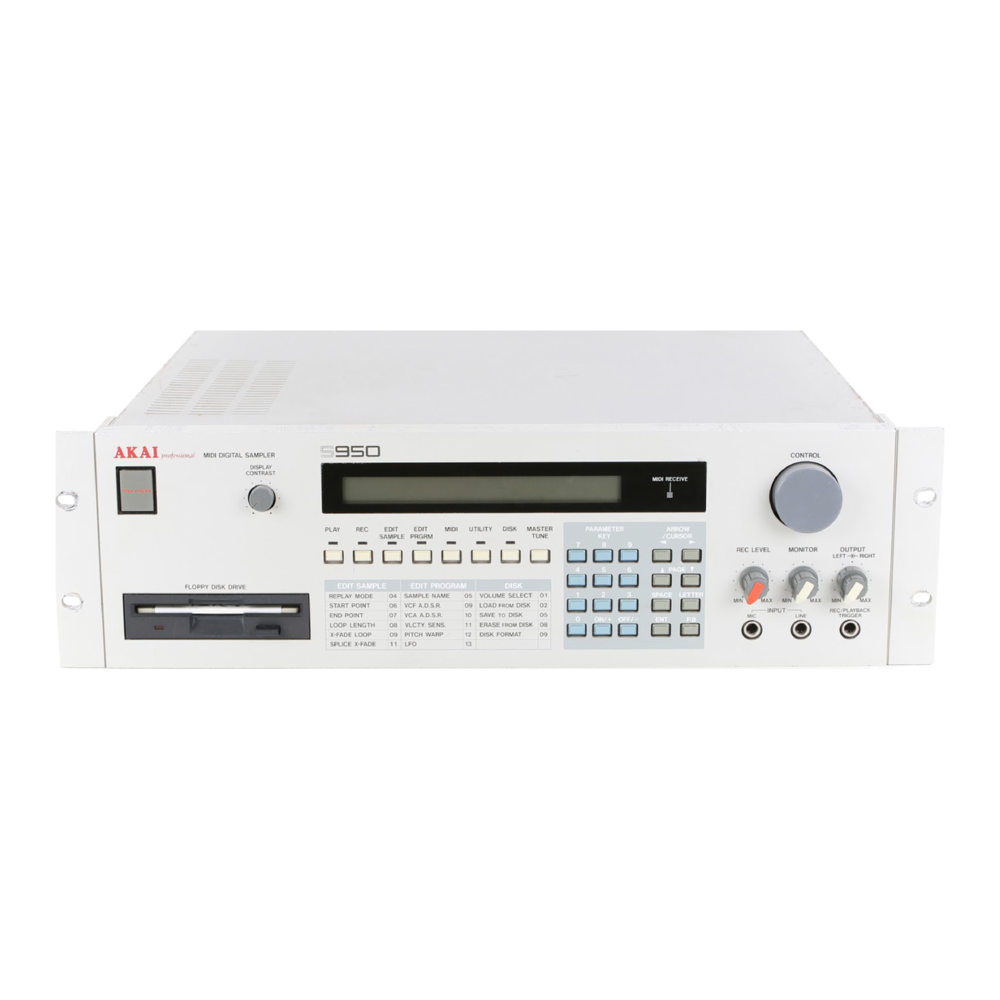
About SuperOS-950
SuperOS-950 is a replacement operating system for the S950 sampler. It keeps every factory page, every disk format and the full factory capacity (99 looped samples and the full sampling pre-trigger buffer), and adds the features below. Sound disks written on the factory OS load on SuperOS, and the other way round.
It starts from a floppy, a USB floppy emulator or a SCSI disk on an unmodified machine, or from a pair of EPROMs as the power-on system. Starting it from a disk changes nothing inside the sampler: switch off, and the machine is stock again.
| Feature | What it does | Section |
|---|---|---|
| Keygroup Start and End | A start and end point per keygroup in 16,384 steps, set on EDIT PROGRAM *04 or over MIDI, saved with the program. The sample itself is never changed. | 6, 7 |
| Portamento and AA cap | A glide time and an anti-alias filter cap per keygroup. | 6 |
| Live MIDI control | Filter (CC 74), loudness and pitch per keygroup; filter and loudness follow on notes already sounding. | 8 |
| Envelopes and LFO over MIDI | Fixed controller numbers for both envelopes, the filter envelope amount and the LFO. | 9 |
| Tempo-locked LFO | Send MIDI clock and every LFO locks to it, with a division per keygroup. | 10 |
| Instant attack | Attack 0 really starts at full level, on the filter and volume envelopes. | 11 |
| Key ranges from the keyboard | Play the low and high key to set a keygroup's range. | 12 |
| Zero-crossing snap | ENT on a start, end or loop field moves it to the nearest zero crossing. | 13 |
| Disk safety | Every floppy save is read back and checked; clearing memory and formatting a floppy ask for confirmation. | 4 |
| Chop | Cut a new sample out of an existing one without using any sample memory. | 14 |
| Transwave | The keygroup LFO walks a one-cycle loop through the cycles of a wavetable sample while a note holds. | 15 |
| SCSI drop-box | A computer puts samples and programs straight into memory over the SCSI disk. | 16, 17 |
Anything not described in this manual works as the factory manual describes.
Finding Your Way Around
The Start-Up Display
When SuperOS is running, the first line of the start-up display shows the model, the version 5.0.1 and the installed memory, and the second line reads:
SUPEROS EDITION SUPEROS303.COM
If the version reads 1.2, the factory OS is running.
Pages and Fields
Pages work as on the factory OS. A page is named by its section key and number: "EDIT PROGRAM *04" means press EDIT PRGRM, then type 0 4 with the cursor on the page number (or step there with PAGE). Move between fields with the CURSOR keys. Change a value with the CONTROL knob or the digit keys; switches take ON/+ and OFF/−. Fields marked (ENT) run when you press ENT on them.
Where the New Controls Are
| Where | What is there |
|---|---|
| UTILITY | The two SUPEROS pages: controller numbers (*01), knob send and AA cap controller (*02). Section 5. |
| EDIT PROGRAM *04 | Start, End, Porta and AAcap for each keygroup. Section 6. |
| EDIT PROGRAM *14 | EndLFO, the transwave depth. Section 15. |
| EDIT SAMPLE *07 | Chop and the slice name. Section 14. |
| Fixed controller numbers | Filter, envelopes, LFO and MIDI clock need no setup. Sections 8 to 10. |
Starting SuperOS
Every S950 can load an operating system from disk: when you load an entire disk and it holds an OS file, the machine loads that file and restarts into it. SuperOS uses this. The loaded system lives in memory only, so switching off returns the machine to the system in its EPROMs.
Starting a new OS clears sample memory. Save what you need first, start SuperOS, then load your sounds. A SuperOS disk can also carry sounds: they load right after the restart.
From a USB Floppy Emulator
- Copy AUTOBOOT.HFE to the USB stick (it takes slot 0), or copy the -DD.hfe file under its own name to any slot. Use the DD image unless your emulator is set up for HD.
- Select the image on the emulator.
- Switch the sampler on, or load the disk as described below.
From a Real Floppy
Write -DD.img to a genuine double-density disk (or -HD.img to a high-density disk) with a flux-level floppy writer using the sampler's own native format. Ordinary computer formatting tools cannot make a disk the S950 reads. Erase an HD disk before writing it.
Loading the Boot Disk
Switching on with the boot disk in the drive starts SuperOS by itself. With the machine already running, load it from the DISK section:
| Operation | Result | Notes | |
|---|---|---|---|
| 1 | Press DISK, type 0 2. | The load page: Clear mem & load disk (1), Load disk (2), Clear prev (3). | |
| 2 | Move the cursor to the option field and type 1. | PRESS AGAIN TO CONFIRM | Only when SuperOS is already running. The factory OS loads at once. |
| 3 | Type 1 again. | The disk loads and the machine restarts. | Moving the cursor instead cancels. |
| 4 | Read the start-up display. | Version 5.0.1 over SUPEROS EDITION. |
From a SCSI Disk
S950 with a SCSI interface board
SuperOS can live on the SCSI disk, so an update is a file copy. The supplied image holds a volume named SUPEROS with the OS file in it, and an empty volume named DROPBOX for section 16.
- Copy HD00_512.hda to the root of the SD card of an SD-card SCSI emulator and keep that name: the name sets SCSI ID 0, the only ID the S950 uses. For a real SCSI disk, write the file to it raw, at ID 0.
- Switch the SCSI device on before the sampler.
- Press DISK. On page *01 move the cursor to Slct,create, turn the knob to SUPEROS and press ENT.
- Type 0 2, then 1 and 1 again, as in the table above.
From EPROMs
A SuperOS EPROM pair makes it the power-on system, with no boot disk. A boot disk still overrides it until the next power cycle. EPROM binaries are not part of the download; pre-programmed pairs will be offered in the shop.
- With the sampler unplugged, find the two OS EPROMs, IC11 and IC12, and note which way their notches face.
- Fit the SuperOS pair: MSB in IC11, LSB in IC12, notches the same way.
- Switch on with the volume down. The SuperOS start-up display appears within two seconds. If not, switch off and check orientation and seating.
- Keep the factory pair.
That completes starting SuperOS.
Disk Safety
Confirm Before Clearing or Formatting
These actions now ask first. The top line reads PRESS AGAIN TO CONFIRM; repeat the same key to go ahead, or move the cursor to cancel.
| Action | Page | Key |
|---|---|---|
| Clear mem & load disk | DISK *02 | 1, then 1 |
| Format floppy | DISK *09 | ENT, then ENT |
| Format it (1), when a save asks for a new floppy | "This disk now full" prompt | 1, then 1 |
Verify After Write
Every floppy save is read back and checked. A bad sector is written again once before any error is shown, so a disk that would have failed at load time is caught at save time.
Saving the Whole Disk
DISK *05 "Clear volume and save entire memory" always saves your sounds. (On the factory OS a sample with a special name turned this into an OS save, which would write a broken SuperOS disk. That is gone.)
The SUPEROS Pages
Press UTILITY. Page *01 sets which MIDI controller does what; page *02 holds the knob send switch and the AA cap controller.
Page *01: Controller Numbers
*01 SUPEROS *StartCC 13 *PortaCC 5 *LoudnessCC 11 *PitchCC 12 *EndCC 0
| Field | Default | What the controller does |
|---|---|---|
| StartCC | 13 | Sample start point (coarse). Its fine partner is StartCC + 32, so CC 45 by default. Section 7. |
| PortaCC | 5 | Portamento time, 0 to 127. |
| LoudnessCC | 11 | Keygroup loudness, 0 to 100 = −50 to +50. Section 8. |
| PitchCC | 12 | Keygroup transpose, 64 = no change, up to 50 semitones either way. Section 8. |
| EndCC | 0 (off) | Sample end point. Section 7. |
Page *02: Knob Send and AA Cap
*02 SUPEROS *FiltKnob OFF *AAcapCC 0
| Field | Default | What it does |
|---|---|---|
| FiltKnob | OFF | ON sends panel edits of a keygroup's Filter and Loudness (EDIT PROGRAM *06 and *08) out of MIDI OUT as CC 74 and LoudnessCC, on the basic channel. Only changed values are sent. Record knob moves into a sequencer and play them back. |
| AAcapCC | 0 (off) | A controller that sets the AA cap (section 6): values 0-31 = 0, 32-63 = 1, 64-95 = 2, 96-127 = 3. |
How the Controllers Apply
- Every controller writes all keygroups that receive on its channel, following the keygroup channel offsets (EDIT PROGRAM *16) and omni.
- Type a controller number as three digits, for example 0 0 2. EndCC and AAcapCC at 0 are off; the other fields at 0 answer controller 0.
- CC 1, 7, 64 and 123 (mod wheel, volume, sustain, all notes off) are handled by the factory OS first and never reach these features.
- The assignments are not saved. They return to the defaults at every start-up. The keygroup values they write are saved with the program.
Keygroup Page *04
EDIT PROGRAM
*04 *KG1 *Start 0,000 *End 0,000 *Porta 0 *Vel sw thresh 128 *AAcap 0
The cursor walks the page in reading order: KG, Start (Coarse, Fine), End (Coarse, Fine), Porta, Vel sw thresh, AAcap. Choose the keygroup in KG; with KG at 00 an edit changes every keygroup of the program at once. Vel sw thresh is the factory field.
| Field | Range | What it does |
|---|---|---|
| Start | 0,000 to 16,383 | Where notes of this keygroup start, in 16,384 steps across the sample. 0,000 = off: the sample's own start. |
| End | 0,000 to 16,383 | Where notes of this keygroup end, on the same scale. 0,000 = off: the sample's own end. A loop hangs off the end point, so End also moves the loop. |
| Porta | 0 to 127 | Portamento time. 0 = off. Each note glides from the previous note's pitch, monosynth style. Keygroups glide independently. |
| AAcap | 0 to 3 | Anti-alias filter cap. 0 = factory (follows pitch), 1 and 2 = one or two octaves brighter, 3 = filter off. Brighter, grittier high notes. |
Setting a Value
Start and End read cc,fff: Coarse counts thousands of steps, Fine counts single steps. One click of the knob on Coarse moves 1,000 steps (about a sixteenth of the sample); on Fine, one step. Or type the digits: Coarse 1 6 and Fine 3 8 3 gives 16,383, the last word.
| Operation | Result | Notes | |
|---|---|---|---|
| 1 | Press EDIT PRGRM, type 0 4. | Page *04. | |
| 2 | Cursor to KG, type 0 1. | *KG1 | 00 would edit every keygroup. |
| 3 | Cursor right to Start Coarse, turn the knob to 8. | Start 8,000 | Half way through the sample. |
| 4 | Play a note. | The note starts from the middle. | A note already sounding keeps its points. |
| 5 | Turn Coarse back to 0 (Fine at 000). | Start 0,000 | The sample's own start again. |
Start and End over MIDI
Start Point
StartCC (default 13) sets the Start of every keygroup on its channel. On its own it moves in 128 steps. Its fine partner, StartCC + 32 (default CC 45), adds the remaining resolution: send both, coarse first, for the full 16,384 steps. Most sequencers send the pair for you when you assign a 14-bit controller. A coarse message on its own clears the fine value. With StartCC above 95 there is no fine partner.
| Where | Resolution |
|---|---|
| EDIT PROGRAM *04 Start | 16,384 steps, per keygroup or all |
| StartCC alone | 128 steps |
| StartCC + its fine partner | 16,384 steps (every word, on samples under 16,384 words) |
| EDIT SAMPLE *06 START POINT | The exact word; changes the sample itself |
End Point and the Sweep
Set EndCC on UTILITY *01 to a controller number (2, breath, works well) and that controller sets the End of every keygroup on its channel, in 128 steps. CC 127 is the whole sample; lower values end earlier.
On a one-shot this changes the length from note to note. On a looped sample it is more useful: the loop hangs off the end point and keeps its length, so moving the end moves a fixed-length loop window through the sample, and each note sustains on the part the controller picked.
| Operation | Result | Notes | |
|---|---|---|---|
| 1 | EDIT SAMPLE *04: set replay mode to Looping (2). | ||
| 2 | EDIT SAMPLE *08: set a loop length. | Short for a scan, long for a slow sweep. | |
| 3 | Press UTILITY, cursor to EndCC, type 0 0 2. | *EndCC 2 | |
| 4 | Move the controller, then play. | Each new note sustains on a different part of the sample. | Full up is the whole sample again, exactly. |
- Velocity-switched keygroups move their soft and loud samples together.
- If the end is swept below the Start you have set, the start moves down with it.
- The controller writes the same value as *04 End: it is saved with the program and the sample is not changed.
- A note keeps the points it started with; the controller changes the next note.
- When the replay memory is nearly full (close to 99 looped samples), a note plays the sample's own points instead.
Filter, Loudness and Pitch over MIDI
| Controller | Value | Sets | Notes already sounding |
|---|---|---|---|
| CC 74 (fixed) | 0-99 | Keygroup Filter (EDIT PROGRAM *06 / *08) | Follow the sweep |
| LoudnessCC (11) | 0-100 = −50 to +50 | Keygroup Loudness | Follow |
| PitchCC (12) | 64 = 0, up to ±50 semitones | Keygroup Transpose | From the next note |
CC 74 is the MIDI standard brightness controller, so most sequencers name it correctly. Values above a field's range stop at the top of the range. The page shows the new value the next time it is drawn.
To record knob moves as MIDI, switch FiltKnob ON on UTILITY *02 (section 5).
Envelopes and LFO over MIDI
These controller numbers are fixed and always on. Each one writes the keygroup value of every keygroup on its channel. Where MIDI defines a controller for the job, that number is used.
| CC | Sets | Page | Value |
|---|---|---|---|
| 73 / 75 / 79 / 72 | Volume envelope attack / decay / sustain / release | EDIT PROGRAM *10 | 0-99 |
| 80 / 81 / 82 / 83 | Filter envelope attack / decay / sustain / release | EDIT PROGRAM *09 | 0-99 |
| 85 | Filter envelope amount | EDIT PROGRAM *09 | 0-100 = −50 to +50 |
| 76 | LFO rate (clock division while locked, section 10) | EDIT PROGRAM *13 | 0-99 |
| 77 | LFO depth | EDIT PROGRAM *13 | 0-99 |
| 78 | LFO delay | EDIT PROGRAM *13 | 0-99 |
| 86 | LFO desync | EDIT PROGRAM *13 | 0-63 off, 64-127 on |
| 87 | EndLFO, the transwave depth (section 15) | EDIT PROGRAM *14 | 0-99 |
Values above the range stop at 99.
Tempo-Locked LFO
Send MIDI clock and every LFO locks to it. There is nothing to switch on. While clock is arriving, a keygroup's LFO Rate (EDIT PROGRAM *13, or CC 76) picks a note value instead of a speed:
| Rate | One LFO cycle per | Rate | One LFO cycle per |
|---|---|---|---|
| 0-11 | whole note | 48-59 | eighth note |
| 12-23 | half note | 60-71 | eighth-note triplet |
| 24-35 | quarter note (one beat) | 72-83 | sixteenth note |
| 36-47 | quarter-note triplet | 84-99 | sixteenth-note triplet |
- MIDI Start lines every LFO up on the downbeat.
- About a second after the clock stops, the LFOs run free from where they were and Rate means speed again.
- Each keygroup has its own division. The lock does not drift, however long the song.
- Keygroups on the same division share a phase, so Desync only matters while running free.
Instant Attack
On the factory OS, attack 0 still fades in slightly, which softens the first transient of drums. With SuperOS, attack 0 is instant; attack 1 keeps the old soft start, so you can compare the two by switching between 0 and 1. Attack 2 and up are unchanged.
| Envelope | Page | Attack 0 on SuperOS |
|---|---|---|
| Filter | EDIT PROGRAM *09 Attk | The filter is fully open from the first moment. Audible when Amnt is not zero. |
| Volume | EDIT PROGRAM *10 Attack | The note starts at full level. |
Key Ranges from the Keyboard
EDIT PROGRAM *05 and *07
With the cursor on a Low key or Hi key field, a note from your MIDI keyboard sets the field. The cursor then steps on, so the next note lands in the next field.
| Operation | Result | Notes | |
|---|---|---|---|
| 1 | EDIT PRGRM, type 0 5. | The soft-sample page with the keygroup's range. | *07 is the loud-sample page. |
| 2 | Cursor to Low key. Play the lowest note. | Low key shows the note. | The note sounds as you play it. |
| 3 | Play the highest note. | Hi key shows the note. | A high key below the low key sets both to that note. |
Zero-Crossing Snap
EDIT SAMPLE *06, *07 and *08
Press ENT on the Coarse or Fine field of START POINT (*06), END POINT (*07) or LOOP LENGTH (*08) and the point moves to the nearest zero crossing within 64 words. On LOOP LENGTH it snaps the start of the loop. Knob and digit edits work as before; only ENT snaps.
Chop
EDIT SAMPLE *07
*07 END POINT *Coarse *Fine *Chop(ENT)_ (0000,100- 1,800) 1,800 *#TONE01
A chop is a new sample that uses the audio of the sample it came from. It takes a directory slot and no sample memory, so a break cut into eight slices uses no more memory than the break.
| Operation | Result | Notes | |
|---|---|---|---|
| 1 | EDIT SAMPLE *01: select the sample. | The chop is taken from the current sample. | |
| 2 | Type 0 7. | The name field shows the slice's name, e.g. #TONE01. | |
| 3 | Set the end point with Coarse and Fine. | Set a start on *06 first if you want one. | |
| 4 | Cursor to Chop, press ENT. | The slice is in memory. The name steps to #TONE02. | Set the next end point and repeat. |
- Its own range. A slice is a sample of its own length. Select it and every page treats it that way. The source keeps its full length and is not changed.
- Names. The name field offers a #, the first four characters of the source name and a number. Numbers are never reused, even after a slice is deleted. You can change the six characters after the # before pressing ENT; the # itself stays.
- Chop a chop. Select a slice and chop it the same way. The new slice is named from the slice's own name, # included: ##TON01.
- Play them together. A source, its slices and their slices can be in different keygroups and play at the same time.
- Deleting. Deleting a slice frees its directory slot. The audio is freed when the last sample using it is deleted.
Transwave
EDIT PROGRAM *14
*14 LFO DEPTH *Aft.tch *Mod.whl *EndLFO *KG1 0 50 0
A transwave is a sample made of many single-cycle waveforms in a row, looped one cycle long. Move the loop to another cycle and the tone changes while the note holds. Because each move is a whole cycle, there is no click. EndLFO makes the keygroup's LFO do the moving.
| Operation | Result | Notes | |
|---|---|---|---|
| 1 | EDIT SAMPLE *04: Looping (2), or Alternating (3). | Use a wavetable sample or a steady tone. | |
| 2 | EDIT SAMPLE *08: set the loop to exactly one cycle. | 32 words or more. | |
| 3 | EDIT SAMPLE *07: put the end point where the sweep should centre. | The loop sits just before the end point. | |
| 4 | EDIT PRGRM *14: select the keygroup, cursor to EndLFO, set a depth. | The LFO swings the loop the same number of cycles each way. 99 reaches the first cycle of the sample; the other way stops at the sample's end. 0 is off. CC 87 sets it too. | |
| 5 | EDIT PROGRAM *13: set the LFO rate. Hold a note. | The tone sweeps through the cycles and back. | Try 20 for a gentle wobble. |
- The walk starts once the note reaches the loop; the body of the sample plays as usual first.
- One-shot samples never move, whatever the depth.
- Loops shorter than 32 words do not move. At 40 kHz that is a cycle above 1,250 Hz: loop two cycles instead.
- A loop longer than the sample is ignored.
- EndLFO is saved with the program.
The SCSI Drop-Box
S950 with a SCSI interface board
The drop-box lets a computer put a sample or program into the sampler's memory without using the DISK section. The computer writes the file into the DROPBOX volume of the SCSI disk and leaves a note in a reserved block. While idle, the sampler checks that block about every 4 seconds; when it finds a new file it loads it, exactly as a load from the DISK section.
What You Need
| Part | Requirement |
|---|---|
| Sampler | SuperOS 5.0 or later and a SCSI interface board. |
| SCSI disk | An SD-card SCSI emulator at ID 0 with HD00_512.hda from the download (it holds the SUPEROS and DROPBOX volumes). |
| Wi-Fi (optional) | For loading while the sampler runs: a supported SD-card SCSI emulator board with Wi-Fi, running the SuperOS loader firmware, on a 2.4 GHz network. The editor page lists the supported board. |
| Computer | Python 3.7 or later, for the web editor (section 17) or the command-line drop-box tool. |
Putting the Sampler in Drop-Box Mode
- Start SuperOS. Starting from the SUPEROS volume on the card selects the SCSI disk for you.
- Otherwise press DISK and select a hard-disk volume once on page *01 (Slct,create, knob, ENT).
- Leave the DISK section: press EDIT SAMPLE, EDIT PRGRM or PLAY.
- New files now load by themselves and appear in memory under their own names.
The sampler only checks when all of these are true:
- a hard-disk volume has been selected since start-up;
- it is not in the DISK or REC section;
- no note is sounding;
- no error message is on the display.
Three Ways to Deliver a File
| Way | How |
|---|---|
| Wi-Fi, live | The web editor sends only the changed blocks to the Wi-Fi board. The sampler keeps running and loads the file at its next check, about 6 seconds after you send it. |
| SD card on the computer | Switch the sampler off, put the card in the computer, add the file with the web editor or the drop-box tool's put command, put the card back and start SuperOS. The file loads at the first check after start-up. |
| USB-C card mode | The web editor mounts the Wi-Fi board's card over USB-C, writes it and hands it back. The board leaves the SCSI bus while mounted. |
What Happens
| Case | Result |
|---|---|
| Loading | Voices are silenced for the transfer; programs find their samples, as on any disk load. |
| Same name | The new file replaces the one in memory. Other samples are untouched. |
| Several files written offline | Only the last one announced loads by itself. Load the others from the DROPBOX volume in the DISK section. |
| After a power cycle | A file that already loaded while the sampler ran does not load again. |
| Memory full | The factory memory-full message. Free some memory and send the file again. |
| SCSI cable pulled | One Hard disk not ready message; checking stops until a volume is selected again. |
The Web Editor
The web editor turns audio files into S950 samples and delivers them through the drop-box. It is a small program that runs on your own computer (python3 web/server.py) and opens a page at http://localhost:8150. It is not part of the firmware download; the editor page on this site has it and the setup steps for the Wi-Fi board and the card.
The page has three steps, top to bottom. Each one says whether it is ready before you go on.
Step 1: Connection
| Control | What it does |
|---|---|
| CONNECT OVER WI-FI | Type the board's fixed address and connect. The board stays on the SCSI bus, so files load live. |
| MOUNT CARD | Over USB-C: the board shows its card to the computer and leaves the SCSI bus. EJECT & HAND BACK returns it to the bus. |
| SAVE TO CARD | With the card mounted: the Wi-Fi network and password the board should use. Takes effect after Eject. The password goes to the card only. |
| FIND DEVICES | Checks the address you typed and lists boards on USB and mounted cards. |
Step 2: The Sampler
CHECK NOW asks the sampler whether it is in drop-box mode (section 16) and waits up to about 4 seconds for the answer. Green: ready. Red: the page says why. With a MIDI cable connected, PUT SAMPLER IN DROP-BOX MODE presses EDIT SAMPLE on the sampler for you. Sending is held off until the light is green.
Step 3: Sending Samples
| Control | What it does |
|---|---|
| Drop audio / CHOOSE FILES | WAV, AIFF, MP3, FLAC or anything the browser can play. Converted to mono. |
| Normalize | Raises the level to full scale before conversion. |
| Playback | One-shot or Looped. |
| Rate | The sample rate. 40000 is standard; lower rates use less memory and still play in tune. |
| Load into S950 RAM | On: the sampler loads each file. Off: the file is only stored on the card. |
| Trim, Loud | Start and end in points, and the sample's loudness 0-99 (50 if empty). |
| SEND ALL | Converts and sends everything in the list. |
Programs and Memory
- CREATE PROGRAM: name a program, add a keygroup per sample with its key range and any keygroup value, including Start, End, Porta and AAcap. Bulk edit sets one field on every keygroup. A program on the card can be read back, edited and sent again.
- READ FROM S950 lists what the sampler holds and how much memory is free. UNLOAD SELECTED deletes items from its memory.
- The drop-box panel lists the files on the card: load, listen, export as WAV, delete, or EMPTY DROP-BOX.
MIDI Controller Chart
All controllers write the keygroups on the receiving channel, following the keygroup channel offsets (EDIT PROGRAM *16) and omni. Assignable numbers are set on UTILITY *01 and *02 and return to these defaults at start-up.
| CC | Controls | Type |
|---|---|---|
| 5 | Portamento time, 0-127 (PortaCC) | Assignable |
| 11 | Keygroup loudness, 0-100 = −50 to +50 (LoudnessCC) | Assignable |
| 12 | Keygroup transpose, 64 = 0, ±50 semitones (PitchCC) | Assignable |
| 13 | Start point, coarse (StartCC) | Assignable |
| 45 | Start point, fine: always StartCC + 32 | Follows StartCC |
| off | End point (EndCC) | Assignable |
| off | AA cap, 0-31 / 32-63 / 64-95 / 96-127 = 0 / 1 / 2 / 3 (AAcapCC) | Assignable |
| 72 | Volume envelope release | Fixed |
| 73 | Volume envelope attack | Fixed |
| 74 | Filter, live on sounding notes | Fixed |
| 75 | Volume envelope decay | Fixed |
| 76 | LFO rate, or clock division while locked | Fixed |
| 77 | LFO depth | Fixed |
| 78 | LFO delay | Fixed |
| 79 | Volume envelope sustain | Fixed |
| 80-83 | Filter envelope attack, decay, sustain, release | Fixed |
| 85 | Filter envelope amount, 0-100 = −50 to +50 | Fixed |
| 86 | LFO desync, 64 and up = on | Fixed |
| 87 | EndLFO (transwave depth), 0-99 | Fixed |
| Clock | MIDI clock locks every LFO; MIDI Start aligns them | Always on |
Display Messages
| Display | Meaning |
|---|---|
| SUPEROS EDITION SUPEROS303.COM | Second line of the start-up display: SuperOS is running. |
| PRESS AGAIN TO CONFIRM | Clear-and-load or a floppy format is armed. Repeat the key to go ahead; move the cursor to cancel. |
| SYSTEM ERROR - SWITCH OFF AND ON | The system has stopped. Switch off and on. (The factory OS froze or showed a service screen instead.) |
| Hard disk not ready | The SCSI disk did not answer. Drop-box checks stop until a volume is selected again. |
| UNFM% on a hard-disk volume | A leftover floppy status shown by the factory DISK page. It has no effect on the volume or the drop-box. |
Memory Access over MIDI
The S950 answers three system-exclusive service messages, kept unchanged in SuperOS. With a MIDI cable each way, your own software can read and write the running sampler's memory: the basis for editors, librarians and controllers. The web editor uses them to press panel keys for you.
| Op | Name | Payload | What happens |
|---|---|---|---|
| 0E | PEEK | address lo, hi; length lo, hi | The sampler sends that memory back on MIDI OUT, as a message with op 0C. |
| 0C | POKE | address lo, hi; 00, 00; data | The data is written from the address up. No reply. |
| 0D | CALL | address lo, hi | The processor jumps to the address. No reply. |
F0 47 <ch> <op> 40 00 00 <payload> <checksum> F7
- <ch> is the basic MIDI channel minus one: 00 for channel 1, the start-up setting. With omni on, any channel is accepted.
- Each payload byte is sent as two bytes: its low seven bits, then its top bit.
- The checksum is the exclusive-OR of all the payload bytes as sent.
- Send each message in one burst and wait for a PEEK reply before the next message.
- POKE has no reply; PEEK the range afterwards to check it.
Differences from the Factory OS
Changed
| Factory OS 1.2 | SuperOS 5.0.1 | |
|---|---|---|
| MIDI at start-up | Omni on | Channel 1, omni off |
| UTILITY key | Audio-trigger pages | SUPEROS pages |
| EDIT PROGRAM *04 | Velocity switch threshold | Adds Start, End, Porta, AAcap |
| EDIT PROGRAM *14 | Aftertouch, mod wheel | Adds EndLFO |
| EDIT SAMPLE *07 | End point | Adds Chop and the slice name |
| Attack 0 | Slight fade-in | Instant |
| Past 99 looped samples | Playback can be corrupted | The extra samples play shortened |
| System fault | Freeze or service screen | SYSTEM ERROR message |
| Power-on from EPROM | Checks the floppy drive | Does not touch the floppy drive |
Removed
| Removed | Notes |
|---|---|
| Audio-trigger pages | For the external drum-trigger unit. Their key now opens the SUPEROS pages. |
| RS232 remote control (MIDI *05) | The port still carries MIDI. A settings file that asks for RS232 gets MIDI. |
| MIDI Sample Dump Standard | Replaced by the drop-box. The sampler's own SysEx dump is unchanged. |
| OS save from "save entire memory" | Saving the whole disk always saves sounds. |
| Service screen | Replaced by the SYSTEM ERROR message. |
Files in the Download
| File | Use |
|---|---|
| SuperOS-950-v5.0.1-DD.hfe | DD boot disk for a USB floppy emulator. |
| SuperOS-950-v5.0.1-HD.hfe | HD boot disk for a USB floppy emulator. |
| AUTOBOOT.HFE | The DD boot disk, named for slot 0. |
| SuperOS-950-v5.0.1-DD.img | DD boot disk (800 KB) for writing a real floppy. |
| SuperOS-950-v5.0.1-HD.img | HD boot disk (1.6 MB) for writing a real floppy. |
| HD00_512.hda | SCSI disk image (64 MB) with the SUPEROS and DROPBOX volumes. |
| S950-SuperOS-Owners-Manual.pdf | This manual. |
| S950-SuperOS-Shortcut-Guide.pdf | Every function on one page each: keys and screens. |
| README.txt, LICENSE.txt | Short instructions; your licence. |
| SHA256SUMS.txt | Checksums. Check with shasum -a 256 -c SHA256SUMS.txt. |
Send reports to superos303.com with the start-up display text and what you started from.