Owner's Manual
About superOS-3000
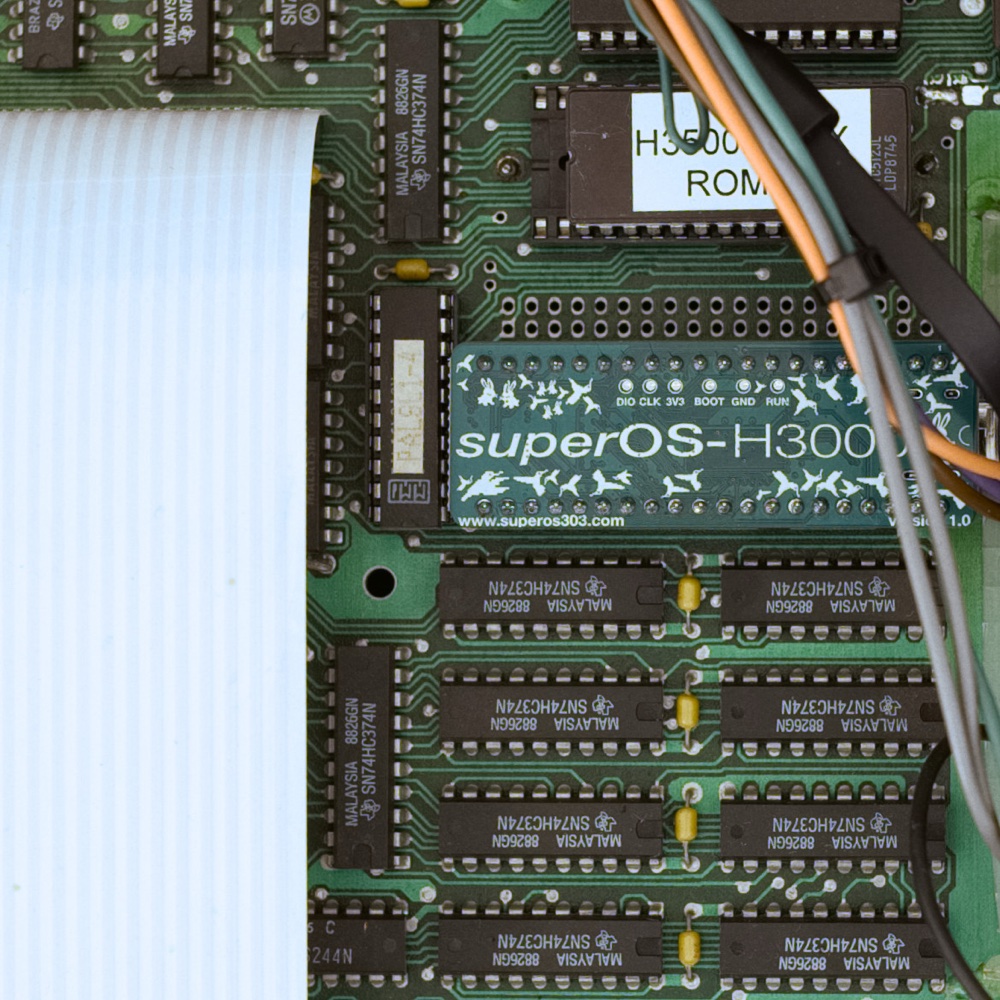
superOS-3000 is a replacement CPU board for the Eventide H3000 and H3500. It plugs into the socket of the 68A09 processor (U50) on the main board. An RP2354B microcontroller runs the 6809 in software and drives the original bus, so the H3000's own operating system and algorithms run unchanged, from the EPROMs in their sockets or from copies in the board's flash.
It adds USB-C MIDI merged with the DIN MIDI ports, mapping of MIDI CC messages to any algorithm parameter, firmware and image updates over SysEx, a 16 MB library of OS and algorithm chip images, and room for new algorithms. Nothing on the H3000 is cut or changed.
Installation
| 1 | Switch the H3000 off and unplug the mains cable. Open the top cover. |
| 2 | Find the 68A09 at U50 on the main board. Note the notch at pin 1. |
| 3 | Lift the 68A09 out of its socket evenly, without bending the pins. Keep it. |
| 4 | Plug the superOS-3000 board into the socket with its printed side up. The half-circle notch on the board and the "1" mark the pin 1 end; it goes where the 68A09's notch was. The USB-C connector sits at that end. |
| 5 | Leave the EPROMs in their sockets for the first start. Close the unit and switch it on. |
A new board has no images in its flash, so it starts in Stock mode and runs the EPROMs in their sockets: the H3000 boots and behaves as it always did. A USB-C cable needs about 5 mm of room above the board at the pin 1 end and a path out of the case.
Modes
| Mode | How to get it | What runs |
|---|---|---|
| Stock | A new board, SysEx MODE stock, or hold keypad 0 at power-up | The EPROMs in their sockets, through the emulated 6809. MIDI goes to the OS as on the stock unit; USB MIDI is not merged in. |
| Enhanced | After an import (the default from then on), or SysEx MODE enhanced | The OS and algorithm images from the board's flash. The EPROM sockets may be empty. USB MIDI merged with DIN, the CC map and the board-only algorithm chips. |
| Import | Hold keypad 1 at power-up, or SysEx IMPORT and power-cycle | Copies the OS EPROM (U53) and the four algorithm EPROMs (U250 to U253) into flash, then boots. |
| Bench | USB-C connected, H3000 switched off | USB, settings and updates only. The board starts normally when the H3000 is switched on. |
Importing the EPROMs
| 1 | With the EPROMs in their sockets, hold keypad 1 and switch the H3000 on. |
| 2 | The display shows the import's progress. When it is done the unit boots in Enhanced mode. |
After an import the EPROMs are no longer read: the board serves the images itself. They can stay in their sockets or come out. The battery-backed preset memory stays on the H3000's main board.
USB-C and MIDI
The board shows up on a computer as a class-compliant USB MIDI device, with no driver. In Enhanced mode, MIDI from USB is merged with the H3000's DIN MIDI in, and SysEx messages and NRPN groups are never split. The H3000 needs FUNCTION MIDI receive switched on as usual.
USB alone never powers or drives the H3000's bus: with the unit off, the board stays in Bench mode.
MIDI CC Control
The H3000 OS already takes NRPN for every algorithm parameter. The board turns a mapped CC into the full NRPN sequence on that CC's channel, so any knob or fader can drive any parameter. Each map entry sets the receive channel (or any channel), the CC number, the NRPN number and the range the CC's 0 to 127 covers. Maps are set, cleared, read and stored with SysEx (Reference, section 1).
The Library
The board's 16 MB library flash holds 63 slots of 256 KB, each an OS or algorithm chip image with a 16-character name. Any slot can stand in for the OS or for chip 0 to 7 from the next power-up. For scale, the factory OS and four algorithm chips are 1.1 MB together, and a factory chip holds 11 to 20 algorithms. Slots are filled, named, listed, selected and deleted with SysEx.
New algorithms load as extra chips that nothing on the main board answers to. They still run on the H3000's own DSP, so a new algorithm has to fit its processing budget.
Firmware Updates
Updates arrive as MIDI SysEx over USB or the H3000's DIN MIDI in. Each update is staged and its CRC checked before anything is used; the previous firmware is kept as a backup, and the display asks for a power cycle to finish.
System Exclusive
Messages to the board are F0 7D 4E 05 <op> ... F7 (device 5). Replies come back
on USB as F0 7D 4E 7F 05 <op> ... F7, and every command is acknowledged with
F0 7D 4E 7F 05 7E <op> <status> F7.
| Op | Command | Does |
|---|---|---|
| 01 | PING | Replies with the firmware version and the chips present |
| 10 to 13 | CC_SET, CC_CLEAR, CC_GET, CC_STORE | The CC map |
| 20 to 22 | UPD_BEGIN, UPD_DATA, UPD_COMMIT | Firmware, OS, chip and library slot updates, CRC checked |
| 23 | BOOTSEL | Restarts into the USB boot drive |
| 30, 31 | MODE, IMPORT | Enhanced or Stock / import, from the next power-up |
| 32 to 35 | LIB_SELECT, LIB_NAME, LIB_LIST, LIB_DELETE | The library |
Recovery
If an update is cut off, or the board fails to start three times in a row, it comes up as a USB drive by itself: copy the firmware file onto it. The same drive appears when the BOOT and GND test pads on the back are bridged while the board powers up.
Returning to Stock
Switch the H3000 off, take the board out of U50 and put the 68A09 back, notch to notch. If the EPROMs were removed after an import, put them back in their sockets too. Nothing else on the unit was changed.
Specifications
| Fits | Eventide H3000 and H3500, 68A09 socket U50 |
| Processor | RP2354B, emulating the 6809 with the original bus timing |
| Memory | 2 MB internal flash; 16 MB library flash (63 slots) |
| Connections | USB-C (MIDI, updates); the H3000's DIN MIDI |
| Board | 56 × 20 mm, 4 layers, board version 1.1 |
Eventide and H3000 are trademarks of Eventide Inc., used solely to identify compatibility. superOS-3000 is an independent product, not affiliated with or endorsed by Eventide.